
Getting Started with User-Generated Content (UGC)
Marketers and agencies face constant pressure to create more content, prove campaign results, and build brands that feel authentic. Traditional ads still matter, but audiences increasingly look to real customer experiences before they trust a brand or buy.
That is where user-generated content (UGC) comes in. This guide walks through how to get started with UGC—what it is, why it works, how to build a simple program, and how to display it on your website with SocialMatix.
What is user-generated content (UGC)?
User-generated content is any brand-related content—photos, videos, reviews, or social posts—created by customers, fans, and advocates rather than by your marketing team. It is digital word-of-mouth at scale: authentic social proof that validates your brand promise in a way polished creative often cannot.
If you need a deeper definition first, start with our primer: What Is UGC?
Why UGC is worth starting now
A practical UGC program can deliver measurable marketing results:
-
Build trust and authenticity. Customers are wary of overproduced ads. Seeing real people use and recommend your product reduces skepticism and strengthens brand perception.
-
Improve loyalty and advocacy. Featuring customer content makes people feel seen. That sense of recognition can turn buyers into repeat customers and community advocates.
-
Support conversions. Reviews, customer photos, and testimonials near product pages, pricing, or signup forms help prospects move forward with more confidence.
-
Reduce content production pressure. UGC becomes a renewable content engine. Instead of commissioning every asset from scratch, teams can curate authentic material already being created by their audience.
Where UGC comes from
Most brand UGC comes from a few core groups:
-
Customers. Organic posts, tagged photos, unboxings, and reviews submitted after purchase. This is usually the most authentic source.
-
Brand advocates. Loyal fans who already create content because they believe in your brand. They are ideal for campaigns, ambassador asks, and featured spotlights.
-
Employees and community partners. Team or partner content is not always “customer UGC,” but it can add credible behind-the-scenes perspective when used thoughtfully.
Types of UGC to collect first
You do not need every format on day one. Start with the types that match your funnel goals:
-
Visual content. Photos and short videos—product-in-use shots, demos, event moments—are easy to display on websites and social walls.
-
Reviews and ratings. Low-friction social proof that works well on product, service, and location pages.
-
Social posts and hashtag content. Instagram, TikTok, Facebook, and X posts from campaigns, launches, and events give you a living stream of community activity.
How to get started: a simple UGC engine
Opportunistic reposts are not a strategy. Getting started means building a repeatable loop: encourage creation, collect content, moderate it, then publish it where it drives results.
1. Set clear goals and KPIs
Decide what success looks like before you launch:
Increase conversion rate on a product or landing page
Grow campaign hashtag participation for a launch or event
Reduce time spent producing weekly social assets
Improve trust signals on homepage or alumni/community pages
Your goal determines what you collect, where you display it, and which metrics matter—engagement, submissions, click-throughs, or conversions.
2. Make participation easy and rewarding
Actively invite your audience to create content:
Launch a branded hashtag campaign with a clear prompt
Ask for reviews after purchase or booking
Run a contest or spotlight series that features the best submissions
Make tagging instructions visible on packaging, receipts, event screens, and emails
The simpler the ask, the more content you will get. “Share a photo with #YourCampaign” works better than complicated submission flows for most first campaigns.
3. Collect and moderate in one place
As volume grows, screenshots and shared folders fall apart. Use a social media aggregator to pull tagged posts, account content, and reviews into a single feed where your team can approve, hide, and organize what goes live.
Always follow rights and attribution best practices. Asking for permission before reuse—and crediting creators—protects your brand and strengthens community relationships.
4. Display UGC on your website and campaigns
UGC that only lives on social media is a missed opportunity. Integrate curated customer content into your owned digital experience:
Homepages for immediate credibility
Product and service pages near decision points
Campaign landing pages with live hashtag feeds
Event screens to encourage real-time participation
Match layout and styling to your brand so the feed feels intentional. Then measure which placements improve engagement or conversion.
How to display UGC with SocialMatix
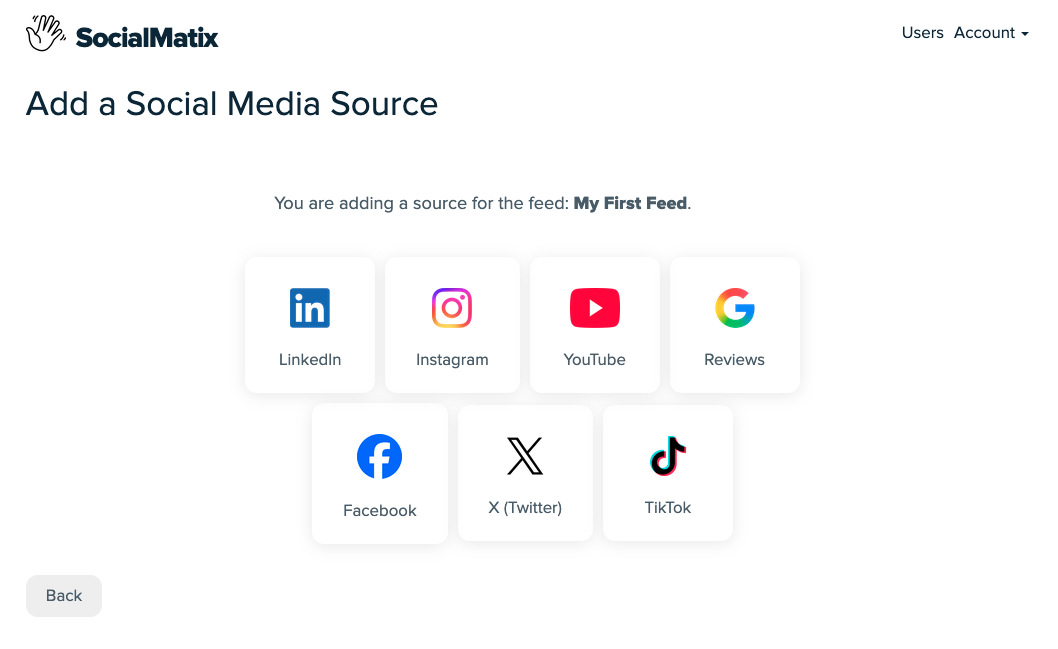
SocialMatix helps marketers and agencies collect UGC from Instagram, Facebook, YouTube, X, TikTok, LinkedIn, and Google Reviews, then embed a moderated social wall on any website.
-
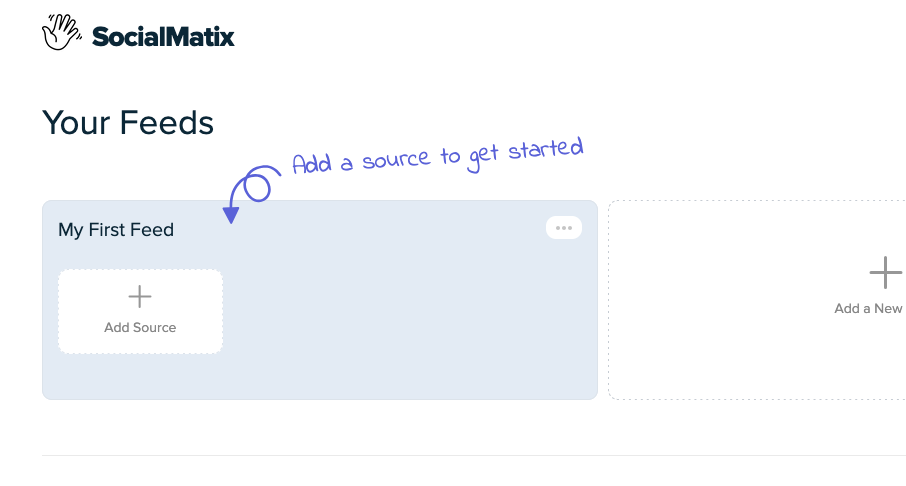
Create a free account and set up a feed for your campaign or website.
-
Add sources such as hashtags, brand accounts, Facebook Pages, or Google review venues.
-
Moderate content so only on-brand UGC appears publicly.
-
Customize the layout to match your site design.

-
Publish and embed the snippet on WordPress, Squarespace, or any CMS that supports HTML.

Getting-started checklist
Choose one campaign, product line, or page as your pilot.
Define one primary goal (trust, conversion, or community participation).
Pick one or two UGC formats to collect first (for example hashtag photos + reviews).
Publish a clear participation prompt for your audience.
Set moderation rules before anything goes live.
Embed approved UGC on one high-visibility page.
Review results after 2–4 weeks and refine prompts, placement, and source mix.
Related guides
The Value of User-Generated Content for Modern Marketing Teams
Social Proof Aggregation: Why It Increases Conversions and How to Set It Up
Frequently asked questions
How do I get started with UGC if I have almost none yet?
Start small. Ask recent customers for a photo or review, launch one simple hashtag prompt, and feature early submissions publicly. Visibility encourages more participation over time.
Do I need a big budget to launch a UGC program?
No. Many teams start with organic hashtag campaigns, review requests, and a free SocialMatix feed. Paid boosts or contests can help later, but they are not required for a first pilot.
How do I keep UGC on-brand?
Set moderation guidelines before launch. Decide what to approve, what to hide, and how to credit creators. A curated feed is safer and more effective than showing every tagged post automatically.
Where should my first UGC display go?
Choose one high-intent page: a product page, campaign landing page, or homepage section near your main CTA. Measure performance, then expand to other pages.
Can agencies run UGC programs for multiple clients?
Yes. Create separate feeds per client or campaign, apply each brand’s moderation standards, and embed the feeds on the relevant websites. This keeps workflows repeatable without rebuilding everything from scratch.
What metrics should I track when getting started?
Track participation (posts/reviews collected), engagement on the embedded feed, and downstream outcomes like click-throughs, form fills, or purchase rate on pages that include UGC.
Is UGC the same as social proof?
UGC is a major source of social proof, but social proof also includes broader trust signals. For how aggregation turns UGC into website conversions, see our social proof aggregation guide.
Final takeaway
Getting started with UGC does not require a complex enterprise stack. Define a goal, invite participation, curate carefully, and put approved customer content where decisions happen—especially on your website.
Ready to launch your first UGC feed? Sign up for SocialMatix free and embed authentic customer content in minutes.