
How to quickly Embed Instagram on your website (plus free tools)
Embedding Instagram on your website keeps your pages fresh, adds visual social proof, and gives visitors a reason to follow your brand without leaving your site. For marketers and agencies, it is one of the fastest ways to connect social activity with campaign landing pages, product pages, and event sites.
This guide walks through two practical approaches: Instagram's built-in embed option for single posts, and a social media aggregator for full feeds that update automatically. Most teams start with the native option, then move to an aggregator when they need more control, moderation, and scale.
Why embed Instagram on your website?
Keep website content current without manual CMS updates.
Showcase visual content that supports trust and engagement.
Highlight campaign hashtags and user-generated content in one place.
Give visitors a direct path to your Instagram profile and community.
Method 1: Embed a single Instagram post (official way)
Instagram lets you embed individual posts or Reels directly. This works well when you want one specific piece of content on a blog post, case study, or landing page.
Step-by-step
Open the Instagram post or Reel in a desktop or mobile browser (not the app).
Click the three-dot menu in the top-right corner of the post.
Select Embed from the dropdown.
Copy the HTML embed code from the popup.
Paste the code into your website's HTML editor, code block, or embed element where you want the post to appear.
Limitations to know
Native embeds only display one post at a time. They do not automatically update when you publish new content, and they offer no moderation, layout customization, or multi-post feed options. For a live Instagram wall or campaign hashtag feed, you will need a different approach.
Method 2: Embed a full Instagram feed with a social media aggregator
A social media aggregator pulls posts from your Instagram account, hashtags, or curated sources into a single embeddable feed. This is the practical choice for marketers and agencies who need automatic updates, brand styling, and content moderation.
Step-by-step with SocialMatix
-
Create a free account. Sign up at SocialMatix and create a new feed for your project.
-
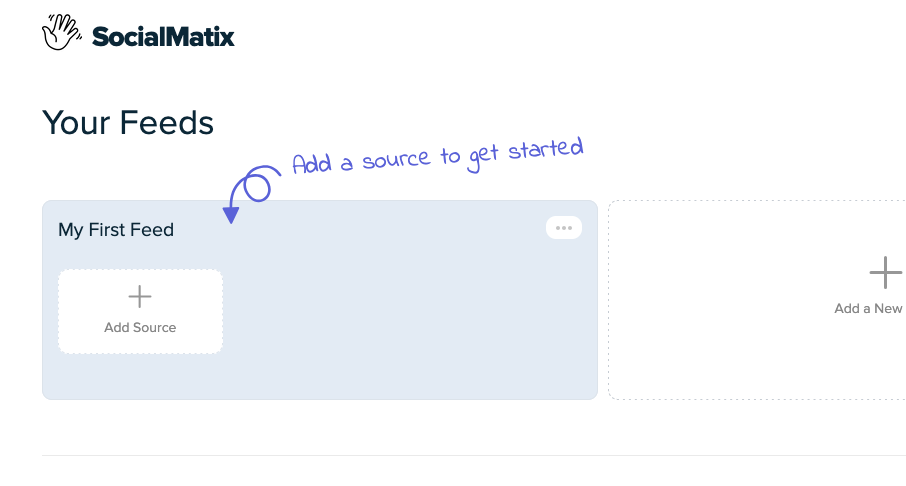
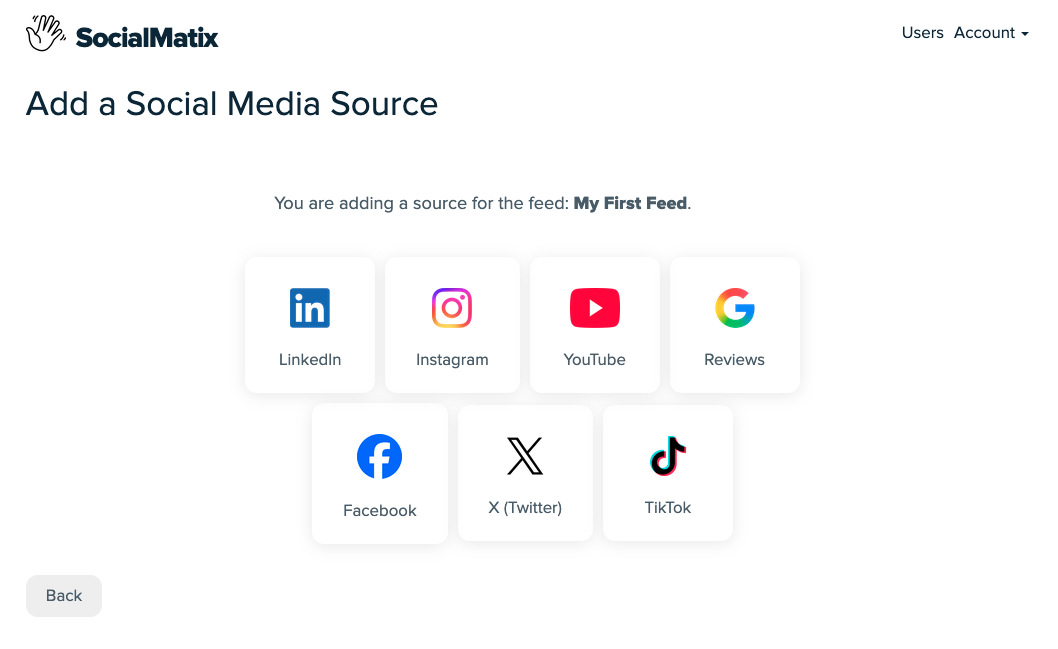
Choose your Instagram source. Click on "Add Source" to start adding your first social account. Connect your Instagram account, or set up a hashtag or mention-based feed for campaign content.
-
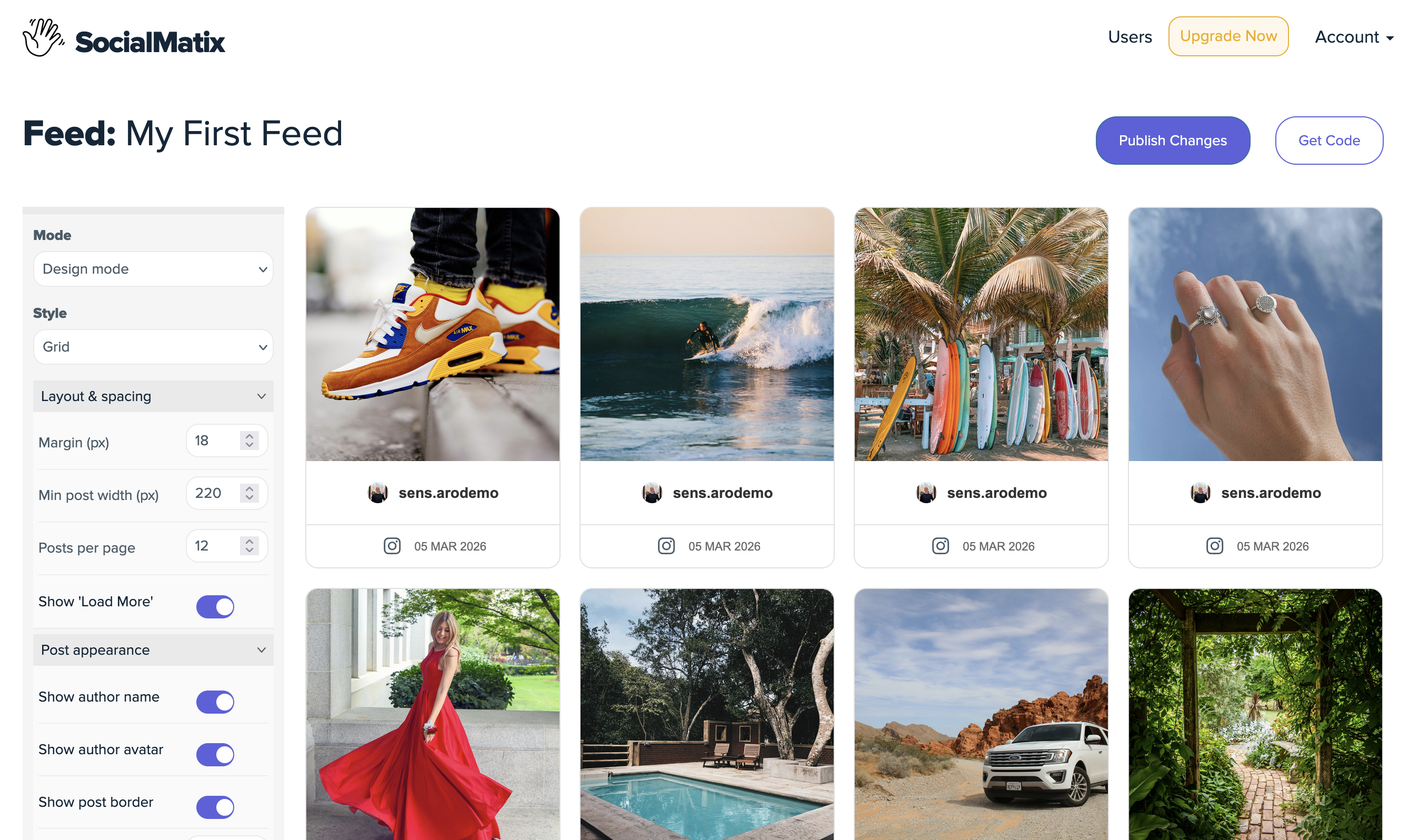
Customize the layout. Match colors, spacing, and display style to your website brand so the feed feels native, not bolted on.
-
Publish your feed. When you're happy with the design, click "Publish" (top right) to add the feed to your website. Use the generated embed snippet for your website builder or CMS.
-
Paste and publish. Add the code to your chosen page—homepage, product page, campaign landing page, or event screen—and verify it loads correctly on desktop and mobile.

Where to place your Instagram feed
Homepage: show recent brand activity and build immediate credibility.
Product or service pages: display customer photos and social proof near decision points.
Campaign landing pages: surface hashtag content from live promotions.
Event pages: highlight attendee posts and real-time community activity.
About or team pages: give visitors a behind-the-scenes look at your brand culture.
Best practices for marketers and agencies
Set moderation rules before launch, not after something off-brand appears.
Test the embed on mobile—most Instagram traffic is mobile-first.
Match feed styling to your site design so the integration feels seamless.
Review feed performance weekly and refine what gets featured.
Use hashtag feeds for campaigns, account feeds for evergreen brand content.
Frequently asked questions
Can I embed Instagram Stories on my website?
Yes, with a social media aggregator that supports Stories as a content source. You will typically need an Instagram Business account and a platform that connects to Instagram's API. SocialMatix lets you curate and display Story content alongside posts and Reels.
Do embedded Instagram feeds work on WordPress, Wix, and Shopify?
Yes. Most website builders support HTML embed codes. Paste the aggregator embed snippet into a custom HTML block, code widget, or embed element on any supported platform.
Will an embedded feed slow down my website?
A well-implemented feed should have minimal impact on page load. Choose a tool that uses efficient loading and caching, and place the feed below the fold on high-traffic pages if performance is a concern.
Can I moderate what appears in my feed?
With a native single-post embed, you control exactly which post is shown. With an aggregator like SocialMatix, you can set automatic approval rules, manually review posts, and filter by source, hashtag, or keyword before anything goes live.
Is the embedded feed mobile responsive?
Quality aggregator feeds adjust automatically to different screen sizes. Always preview on both desktop and mobile before publishing to confirm layout and readability.
5 free tools for embedding Instagram
Choose one of these social media aggregators to curate Instagram content and embed a live feed on your website. Each offers a free tier so you can test before committing to a paid plan.
1. SocialMatix
SocialMatix is a social media aggregator built so you can embed Instagram feeds quickly without any technical ability. Connect your Instagram account or hashtag sources, customize the layout to match your brand, and paste an embed code into any website.
With a straightforward setup flow and practical moderation controls, SocialMatix is a strong fit for campaign landing pages, product pages, and websites that need a polished social wall without a long implementation timeline.
Key features:
Embed Instagram posts, Reels, and Stories from account or hashtag sources
Multi-platform aggregation across Instagram, YouTube, TikTok, and more
Customizable feed layouts and branding options
Content moderation and curation workflows
Unlimited team members on all plans
Plans & pricing:
The free plan includes 3 sources, up to 1,000 posts, daily content refresh, and 2,000 views per month—enough to launch your first feed at no cost. The Growth plan ($24/month) adds hourly refresh, post editing and pinning, and removes branding. The Business plan ($50/month) includes 15 sources, 15-minute refresh, and unlimited views for larger teams and agencies.
2. EmbedSocial
EmbedSocial offers a suite of tools for displaying social content on your website, including widgets for Instagram feeds and Stories. The platform is especially useful if you are collecting user-generated content or managing customer reviews, as it includes rights management tools and social proof features.
Key features:
Supports Instagram Stories, Reels, and feed posts
Responsive, branded feed widgets with auto-updating content
Manual and automatic moderation options
Designed for user-generated content (UGC) collection and display
Option to manage content rights and display verified customer reviews
Plans & pricing:
A limited free plan is available for a single feed with restricted views. To unlock more sources and customization, pricing starts at $29/month. If you need tools for managing UGC rights or social reviews, expect to upgrade to a Premium plan at $99/month or more.
3. Tagbox
Tagbox is a content curation platform designed for brands that want more control over their user-generated content. In addition to feed widgets for Instagram and other social networks, it offers tools for collecting, moderating, and publishing UGC across your site.
With flexible plans for different use cases, Tagbox can be a good fit if you are looking to display curated Stories or build shoppable feeds—but the added features may be more than you need for simple Instagram embeds.
Key features:
Curate and display content from Instagram accounts, hashtags, and reviews
Built-in UGC rights management tools (on advanced plans)
Social commerce features like shoppable posts and product tags
Content moderation and analytics dashboard
Widget customization options for styling and branding
Plans & pricing:
Pricing starts with a free plan or a Starter plan at $19/month, which includes up to two feeds. If you need features like UGC rights management or more robust customization, you will need the Advanced plan, starting at $79/month.
4. Juicer
Juicer is a streamlined social media aggregator that pulls content from major platforms like Instagram, Facebook, TikTok, and X into one unified feed. While it supports Instagram content types including Stories on eligible plans, the platform is best suited for users willing to invest in a paid tier for a cleaner experience.
Key features:
Aggregates content from multiple social networks
Simple feed styling and layout controls
Post filtering and moderation tools
Real-time content updates (on paid plans)
Plans & pricing:
The free plan includes one feed with two sources but displays branding. For a cleaner experience, the Lite plan at $13.50/month removes ads and includes up to three sources for a single feed. For more feeds and additional control, the Pro plan starts at $89/month.
5. Elfsight
Elfsight offers a polished Instagram widget as part of its large library of no-code website apps. The widget allows for manual post selection, with layout options like carousels and grids that work well across platforms. Customization is a major focus, with flexible styling, color theme generators, and full control over placement and design.
While Elfsight's widget catalog is extensive, its pricing and bundling options can be confusing—especially for users who only need Instagram feed functionality.
Key features:
Manual selection of Instagram posts and Stories
Multiple layouts including carousel and grid
Style and layout customization with preset or custom color schemes
Supports most major website builders (WordPress, Shopify, Squarespace, and more)
Custom display settings and page-level targeting
Plans & pricing:
You can get started with a free plan limited to 200 views and one widget, with branding. Paid plans for the Instagram widget alone start at $6/month and scale up based on views and widget usage. Elfsight also offers an all-apps bundle with access to 96+ widgets starting at $18/month.
Final takeaway
Embedding Instagram on your website does not have to be complicated. For a single post, use Instagram's native embed. For a live, moderated, branded feed that updates automatically, use a free social media aggregator and have it running in minutes.
Ready to embed Instagram on your website? Sign up for free with SocialMatix and launch your first feed today.